
For any small but growing business, understanding your website traffic and user behavior is key to building a stronger marketing strategy and achieving your goals with confidence.
But here’s the reality: a lot of small businesses are investing in digital marketing and even setting up Google Analytics… without actually knowing what to track.
If you’ve ever opened up Google Analytics and felt overwhelmed by numbers, charts, and cryptic terms, you’re not alone. This guide will break down the actual metrics that matter, how to track them, and how to use that information to make better decisions, boost engagement, and drive conversions.
Let’s talk about analytics for small business– in simple, clear language you can actually use.
What Exactly is Google Analytics?
If you’ve ever asked yourself that, you’re in good company. A lot of small business owners hear the term thrown around but aren’t totally sure what it actually does.
Think of Google Analytics like the “security camera” for your website– but instead of catching video footage, it captures “footage”– or data– that shows you what your customers are doing on your site.
It tells you things like:
- How many people visited your site
- Where they came from (Google, Facebook, ads, etc.)
- What pages they looked at
- How long they stuck around
- And whether they actually contacted you, bought something, or took the action you wanted
Instead of guessing what’s working in your marketing, Google Analytics gives you the facts. Plain and simple.
And once you understand those numbers– even at a basic level– you can make way better decisions about your website, your ads, and how to get more customers online.
Why Google Analytics Matters for Small Businesses
When you’re running a small business, every dollar needs to work overtime for you. Google Analytics helps you do exactly that by turning raw data into helpful, actionable insights.
Understand Your Audience’s Behavior
Google Analytics shows you essential digital marketing metrics like:
- How many people are visiting your site
- Which pages they’re landing on
- How long they stay
- Whether they take action… or bounce away– or leave– from your site
When you can clearly see what’s working (and what isn’t), your marketing stops feeling like guesswork.
Make Smarter Budget Decisions
Small businesses don’t have a “set it and forget it” marketing budget. Google Analytics helps you:
- See which marketing channels actually bring results
- Identify your strongest ROI sources
- Stop wasting money on weak-performing tactics
These are your key marketing metrics, and once you learn to read them, you’ll feel far more confident in every marketing decision you make.
Stay Competitive in Your Local Market
If you depend on local customers, Google Analytics becomes a powerful tool. It reveals:
- Local search behavior
- How people find your site
- How you stack up against competitors
The right data can literally keep you one step ahead.
If you want to explore the platform more deeply, Google offers its own free starter lessons.
Get started learning more about Google Analytics here.
How to Set Up Google Analytics for Success
Before you dive into the metrics, the first step is setting up your account correctly.
1. Define Your Goals
You can’t measure success if you haven’t clearly defined what success looks like.
For example:
- Are you trying to increase online sales?
- Get more quote requests?
- Boost page views?
- Improve form submissions?
Your goals give your marketing data meaning.
2. Set Up Dashboards to Track Traffic Sources
You need to know where your visitors are coming from.
Common traffic sources include:
- Organic search (Google searches)
- Social media
- Paid ads
- Email campaigns
- Referral websites
This lets you compare every marketing channel and see which ones actually pull their weight.
3. Connect Your Tools
Google Analytics works even better when paired with:
- Google Ads
- Google Search Console
- Your website or eCommerce platform
Connecting these tools gives you a complete picture of your marketing data.
If you’re not sure how to connect everything, that’s something we help with at Good Rep Media. We’ll make sure your setup is clean, accurate, and reliable from day one.
Want to explore more? Check out the official sign up page for Google Analytics for more details.
A Quick Heads-Up: Common Google Analytics Setup Mistakes
Before you move on, it’s worth calling out a few mistakes we see small businesses make all the time when setting up Google Analytics. These aren’t complicated issues– but they can make your data misleading or downright useless if they’re not addressed early.
- Not tracking conversions at all
This is the big one. If Google Analytics isn’t tracking things like form submissions, phone calls, purchases, or sign-ups, you’re basically just counting visitors—not measuring success. - Looking at traffic, but not action
It’s easy to get excited about website visits, but traffic alone doesn’t pay the bills. If you’re not tying traffic back to leads or sales, you’re missing the point of analytics. - Forgetting to define goals before reviewing data
Jumping into reports without clear goals usually leads to confusion. You’ll see lots of numbers, but won’t know which ones actually matter. - Not connecting tools together
When Google Analytics isn’t connected to Google Ads, Search Console, or your website properly, you only get part of the picture– and partial data leads to poor decisions.
The good news? These mistakes are easy to fix once you know what to look for– and getting them right from the start can save you a ton of time, money, and frustration down the road.
And if that list of common mistakes feels a little overwhelming, feel free to give us a call– we’d love to talk you through any questions you may have!
Key Metrics Every Small Business Should Monitor
There are hundreds of metrics inside Google Analytics– but most small businesses only need to focus on a handful.
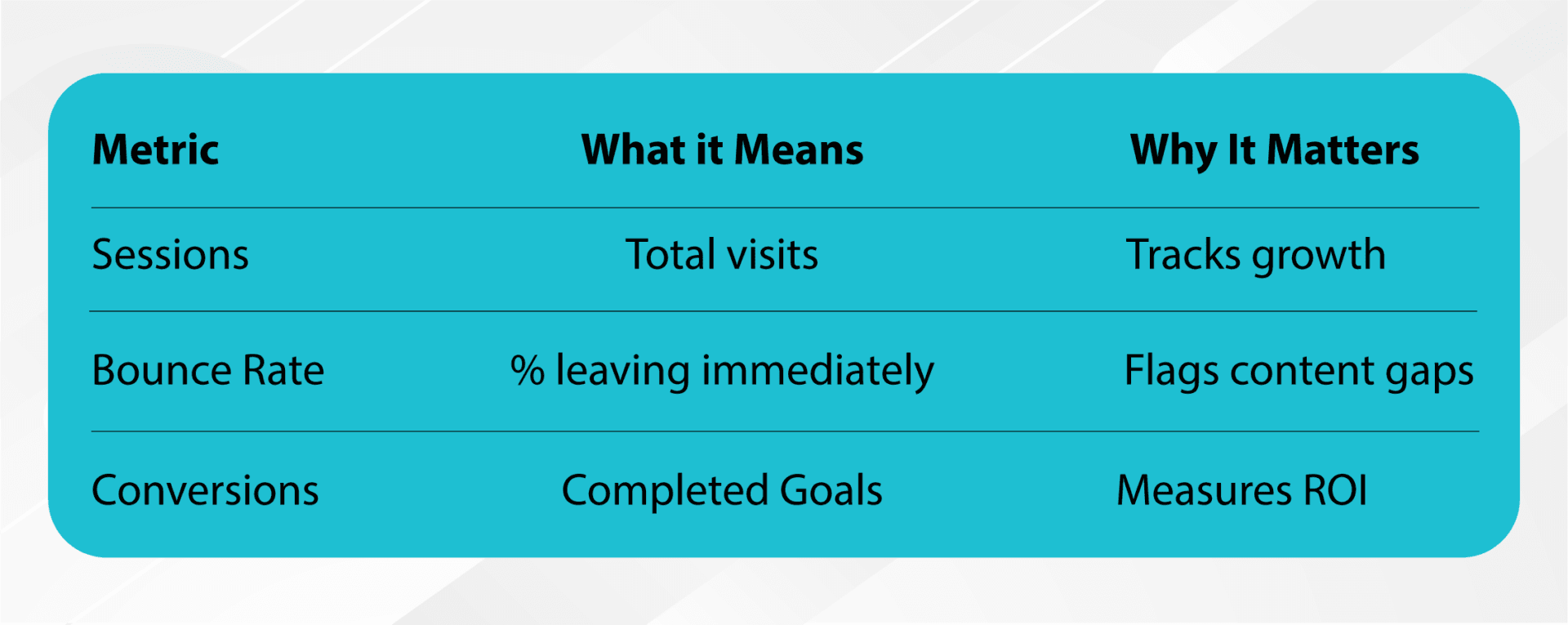
Here are the ones that actually matter:
1. Sessions & Users
Think of this as your foot traffic count.
It tells you:
- How many people came to your site
- How often they’re coming
- Whether that number is going up or down
2. Bounce Rate
Bounce rate tells you how many people left without interacting.
A high bounce rate usually means:
- The page wasn’t helpful
- Your site loads too slowly
- The wrong audience clicked
Fixing your weak pages can make a huge impact.
3. Conversion Rate
This metric tells you how well your website turns visitors into customers.
Conversions can include:
- Purchases
- Phone calls
- Form submissions
- Newsletter sign-ups
Tracking these customer engagement metrics and overall business metrics gives you a crystal-clear picture of what’s working.
4. Top Traffic Sources
You should always know where your best customers are coming from.
This helps you invest your time and marketing budget where it will produce results.
For a deeper dive into digital metrics, this Digital Metrics Reporting Guide is a helpful resource.
Here’s what this looks like in the real world:
There are many ways to cross-reference this information simply once you understand what it is and how it works.
Let’s say you notice a lot of people are visiting your services page, but the bounce rate is high and conversions are low. That’s a clear sign the page isn’t answering the right questions, so people are leaving. So you might tweak the messaging, add clearer calls to action, and then suddenly more visitors start actually reaching out. That’s analytics doing its job.
How to Use Google Conversion Tracking to Measure Success
Conversion tracking is one of the most valuable tools inside Google Analytics.
With Google conversion tracking, you can monitor:
- Purchases
- Form submissions
- Newsletter sign-ups
- Appointment bookings
- Phone call clicks
When you connect Analytics with Google Ads, you can also:
- Track which keywords drove conversions
- See which campaigns perform best
- Adjust budgets automatically based on results
This is how you make your marketing dollars work smarter– not harder.
Want a deeper look at what today’s numbers really mean? Explore our blog: 10 Digital Marketing Statistics You Should Have Known Yesterday.
Understanding Customer Behavior and Journey Analytics
This part sounds complicated, but it’s actually pretty simple once you break it down.
What Is the Customer Journey?
It’s every step a customer takes before buying from you, including:
- First discovering your business
- Researching your services
- Visiting your website
- Engaging with your content
- Making contact
- Converting
Find Where Customers Drop Off
Journey analytics show you where people disappear from your funnel.
This helps you:
- Improve weak pages
- Fix confusing steps
- Keep visitors moving toward conversion
Personalize the Experience
When you understand customer journey analytics, you can tailor your messaging, ads, and website to what customers actually want. This boosts engagement and builds trust.
How to Turn Data into Actionable Marketing Insights
Tracking metrics is great, but turning them into action is what actually grows your business.
1. Focus on the Metrics That Actually Matter
Your most important key performance indicators (KPIs) should always be connected to:
- Lead generation
- Sales
- Revenue
NOTE: Remember that KPI is just another way to say “key numbers that tell us if what we’re doing is actually working.”
Everything else is supporting information.
2. Always Test and Evolve
Use your digital marketing metrics to:
- A/B test ads
- Refine landing pages
- Try new messaging
- Experiment with content
Marketing is a constant learning process.
3. Analyze Your Traffic Sources
This helps you see:
- What’s worth investing more into
- What might need improvement
- What you can possibly cut
This is how small businesses grow smarter, more cost effectively, and stay profitable– not just “getting bigger” without increasing revenue.
We’re Your Google Analytics Experts
Google Analytics might seem intimidating at first, but once you understand a few key metrics, you’ll start seeing your marketing in a completely new light. When you know exactly where customers come from, what they do, and what makes them convert, you can make better decisions that move your business forward.
But most importantly– you don’t have to figure Google Analytics out alone.
Feeling a bit lost in the techy stuff? Totally normal. Grab a call with Cody, our Managing Director, he’ll help you with everything you need. Book a Free call with Cody Now.
FAQs
Q: What is the easiest way to start using Google Analytics for my small business?
A: Start by connecting your website to Google Analytics. From there, track the basics– how many people visit your site, how long they stay, and whether they take action. It’s like turning on the lights in a dark room.
Q: What are the most important metrics for small businesses to monitor?
A: Keep an eye on where your visitors came from (Google, social media, etc.), whether they’re taking action, and how engaged they are. Those numbers tell you what’s working and what needs improvement.
Q: How can analytics improve my marketing ROI?
A: Analytics show you which marketing efforts actually make you money. Once you know that, you can double down on what’s working and cut what isn’t—saving you time AND money.
Q: What is customer journey analytics, and why does it matter?
A: Customer journey analytics show every step a customer takes before buying from you. It helps you spot where people drop off and improve the experience so more customers make it to the finish line.